Received and Incoming reports by Product Type
These two reports group your purchase order quantities and values by Product Type (the product type set on each product in Shopify), so you can see at a glance which categories you're buying the most of:
- Received report by Product Type: what you received over a period.
- Incoming report by Product Type: what you ordered and what is still to arrive.
Go to Reports > Inventory and pick one of the two reports.
Received report by Product Type
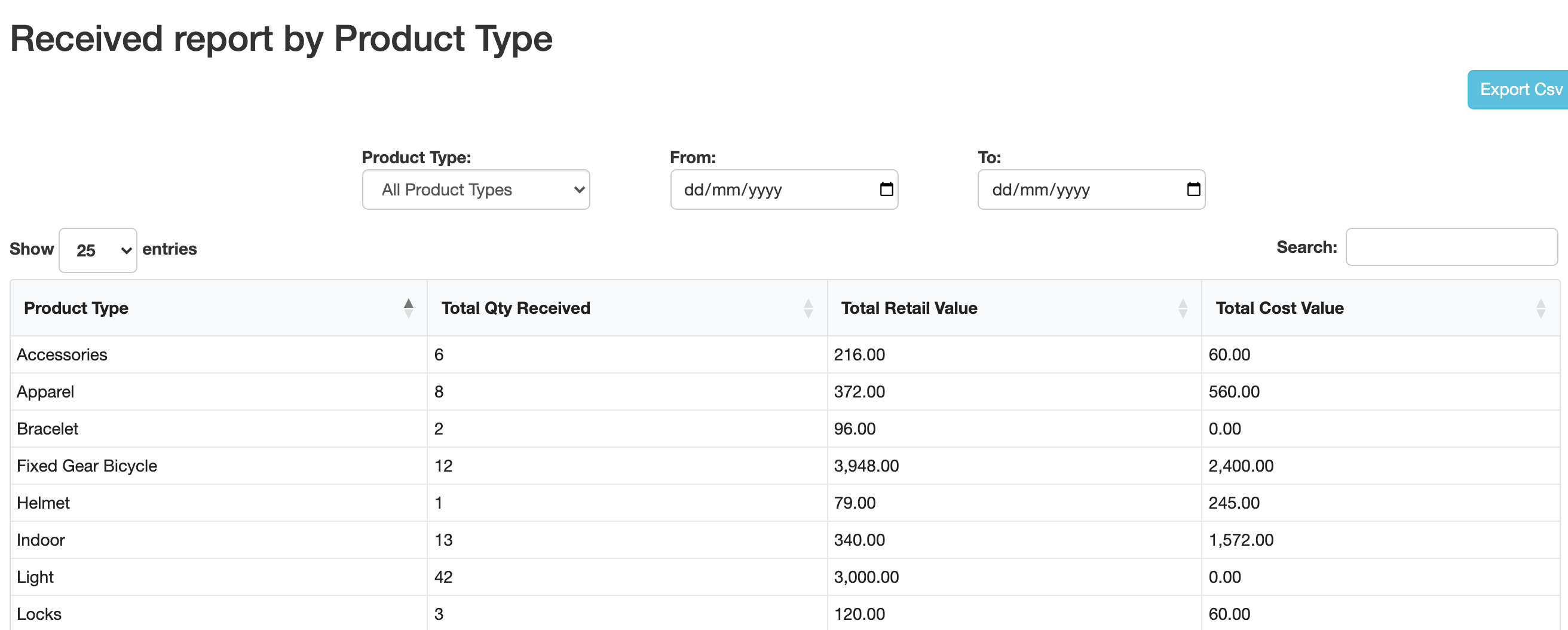
Filters
| Filter | What it does |
|---|---|
| Product Type | All Product Types, one product type, or No Product Type for products without one. |
| From / To | Only count goods received between these dates (the date of each receiving). Leave both empty to count everything you've ever received. |
Columns
Each row is one product type.
| Column | What it shows |
|---|---|
| Product Type | The product type, or No Product Type. |
| Total Qty Received | All units of that type received in the period. |
| Total Retail Value | Units received × the product's current price in Shopify. |
| Total Cost Value | Units received × the cost on the PO line. |
Example: in October you received 10 Helmet A (price $80, PO cost $40) and 5 Helmet B (price $120, PO cost $60), both of type Helmet. The Helmet row shows Total Qty Received 15, Total Retail Value 10 × 80 + 5 × 120 = $1,400.00 and Total Cost Value 10 × 40 + 5 × 60 = $700.00.
Incoming report by Product Type
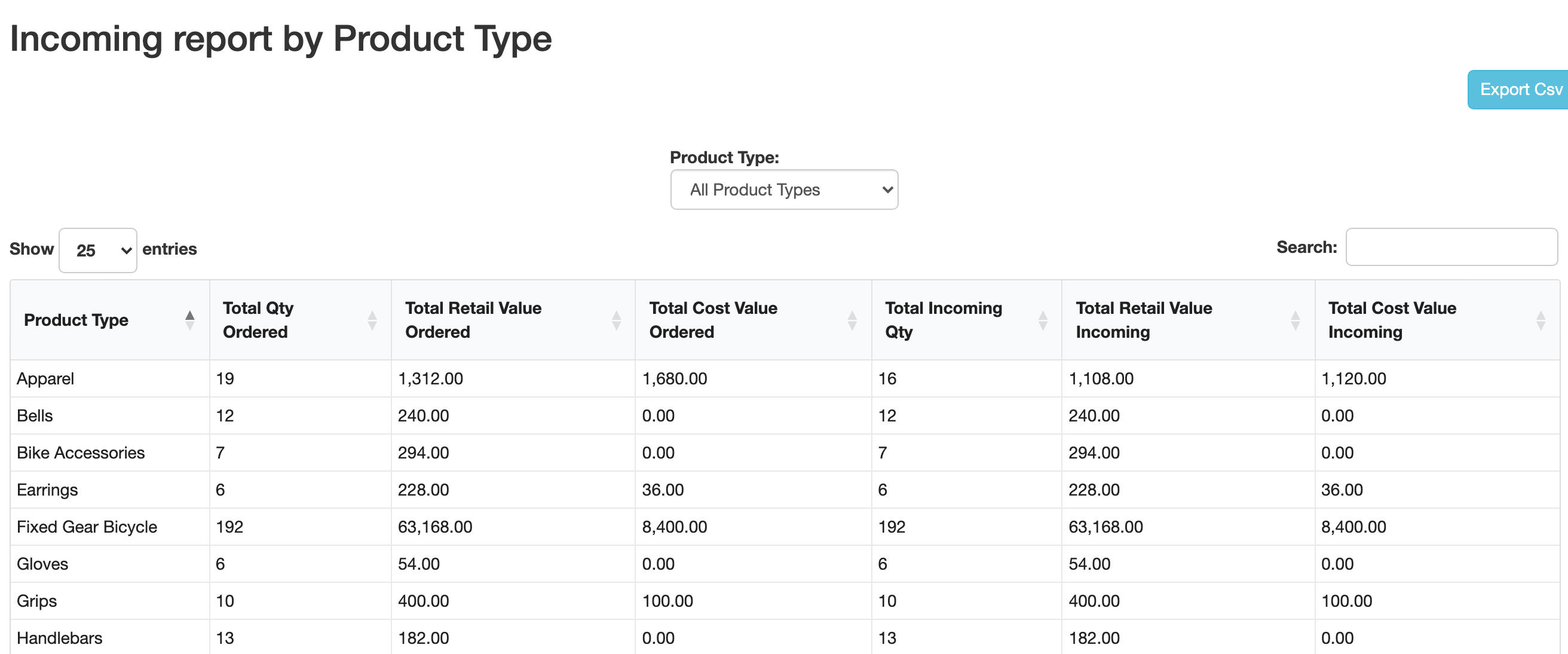
This report only has the Product Type filter: it always shows what is still on order today.
It counts the purchase order lines that still have units to receive (Qty Ordered greater than the units already received). A line that has been fully received isn't counted.
| Column | What it shows |
|---|---|
| Product Type | The product type, or No Product Type. |
| Total Qty Ordered | Units ordered on those lines. |
| Total Retail Value Ordered / Total Cost Value Ordered | Units ordered × the current price in Shopify / × the cost on the PO line. |
| Total Incoming Qty | Units still to arrive: Qty Ordered − units already received. |
| Total Retail Value Incoming / Total Cost Value Incoming | Units still to arrive × the current price in Shopify / × the cost on the PO line. |
Example: a PO line has 20 Gloves ordered at a cost of $5 and 8 already received. It adds 20 to Total Qty Ordered and 12 to Total Incoming Qty, and $60.00 (12 × 5) to Total Cost Value Incoming.
Good to know (both reports)
- The cost is the cost on the PO line, before the line's Discount (%) and Tax (%). PO-level discount, shipping and fees aren't included.
- The retail value uses the product's price in Shopify today, not its price when you ordered.
- Amounts aren't converted between currencies.
- Products added to a PO by hand (not from Shopify), or deleted from Shopify since, aren't included, because they have no product type.
- Use Search to find a product type, and click a column header to sort, for example Total Cost Value to see where most of your budget goes.
Export to CSV
Click Export Csv to download the report with your filters. The file starts with the report title and the filters you picked, then one row per product type with the same columns as the page.
FAQ
A product type I use isn't in the list. No goods of that type were received in the period (Received report), or nothing of that type is still on order (Incoming report).
Why is there a "No Product Type" row? Some of your products have no product type in Shopify. Set one on the product in Shopify to see it under its own row.