Compare Supplier Costs report
The Compare Supplier Costs report puts, side by side for each product variant, the cost each supplier charges you today and the costs you actually paid them on past purchase orders. Use it to choose the cheapest supplier before ordering, or to spot a supplier whose prices keep going up.
Go to Reports > Costs > Compare Supplier Costs. The report is available on paid plans.

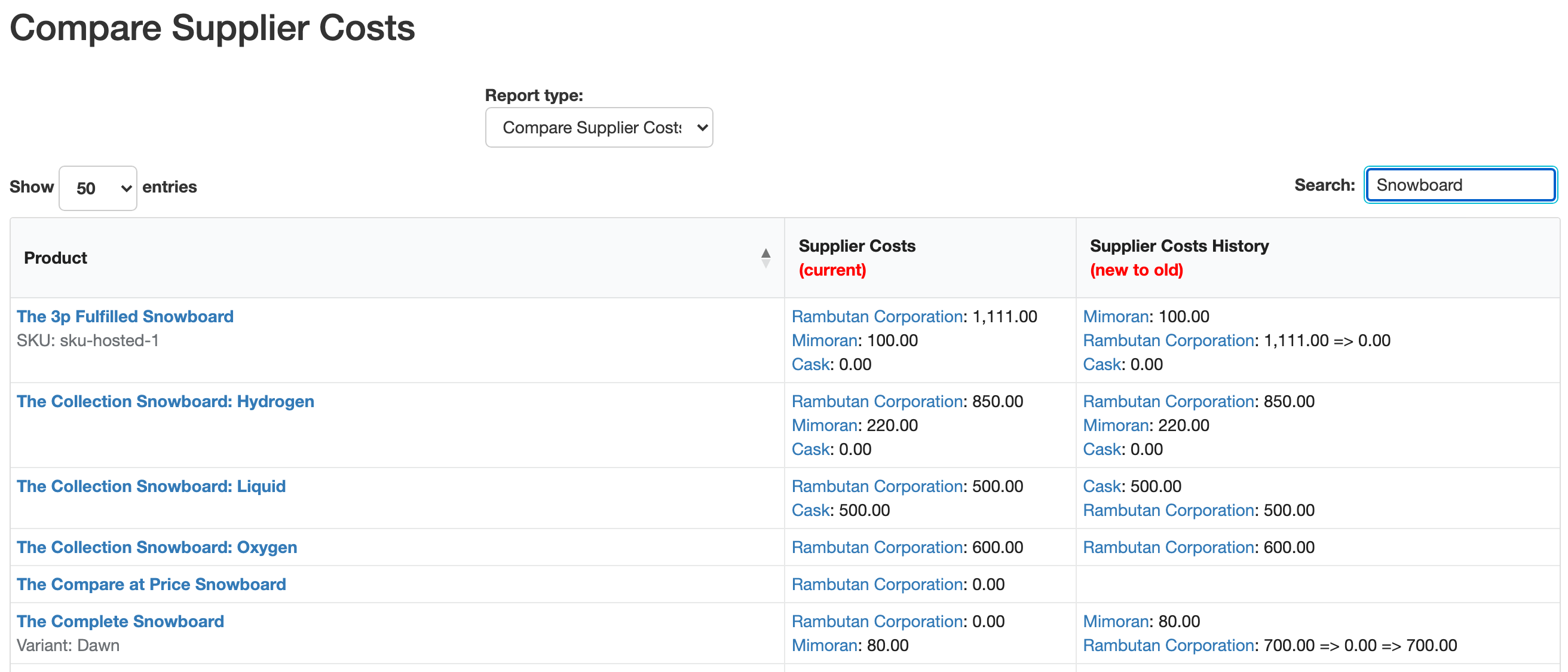
Columns
Each row is one product variant of your Shopify store.
| Column | What it shows |
|---|---|
| Product | The product name, Variant and SKU. Click the name to open the product (or the variant) in Shopify. |
| Supplier Costs (current) | One line per supplier that has this variant in its product list, with the cost saved on the supplier. Click a supplier name to open the supplier. |
| Supplier Costs History (new to old) | One line per supplier you ordered this variant from, with the costs on your purchase orders, from the newest PO to the oldest. |
How to read the history: costs are joined with => from the newest PO to the oldest, and a cost repeated on consecutive POs is shown once.
Example: you ordered Pencil - Blue from Acme on 4 POs, at 4.00 in January, 4.00 in March, 4.50 in May and 5.00 in July. The history shows:
Acme: 5.00 => 4.50 => 4.00
So the latest PO was at 5.00, and the cost went up twice this year.
- Only active suppliers are shown. A supplier you disabled disappears from both columns.
- Supplier Costs (current) comes from the supplier's product list (Suppliers > edit a supplier > products), not from your POs. Update it there when a supplier sends a new price list.
- Supplier Costs History uses the cost on each PO line, before the line's Discount (%) and Tax (%), from POs of every status.
- POs created by vendor (without a supplier) aren't included.
Search, sort and pages
- Search: type part of a product name, variant name or SKU to show only matching variants.
- Click the Product header to sort A to Z, and click again for Z to A. The two cost columns can't be sorted because each cell lists several suppliers.
- The report shows 50 variants per page. Change it with Show ... entries, and use Previous, Next or a page number to move between pages.
The report loads one page at a time, and only looks up the costs of the variants on that page, so it opens quickly even with tens of thousands of variants and years of purchase orders.
FAQ
A variant has no costs at all. No active supplier has it in its product list, and you haven't ordered it from an active supplier yet.
The current cost and the latest history cost are different. The current cost is the price saved on the supplier; the history shows what you entered on the POs. If you negotiated a different price on a PO, the two differ. Update the supplier's product list if the new price is permanent.
Can I export this report? Not yet. Use Search to narrow the list to the products you're comparing.