Goods Received - Invoice Status report
This report lists every time you received goods from a purchase order, with the supplier, the invoice details you entered and the value received. Use it to find deliveries you haven't been invoiced for yet, and to match supplier invoices with what actually arrived.
Go to Reports > Purchase Orders > Goods Received - Invoice Status. The report is available on paid plans.
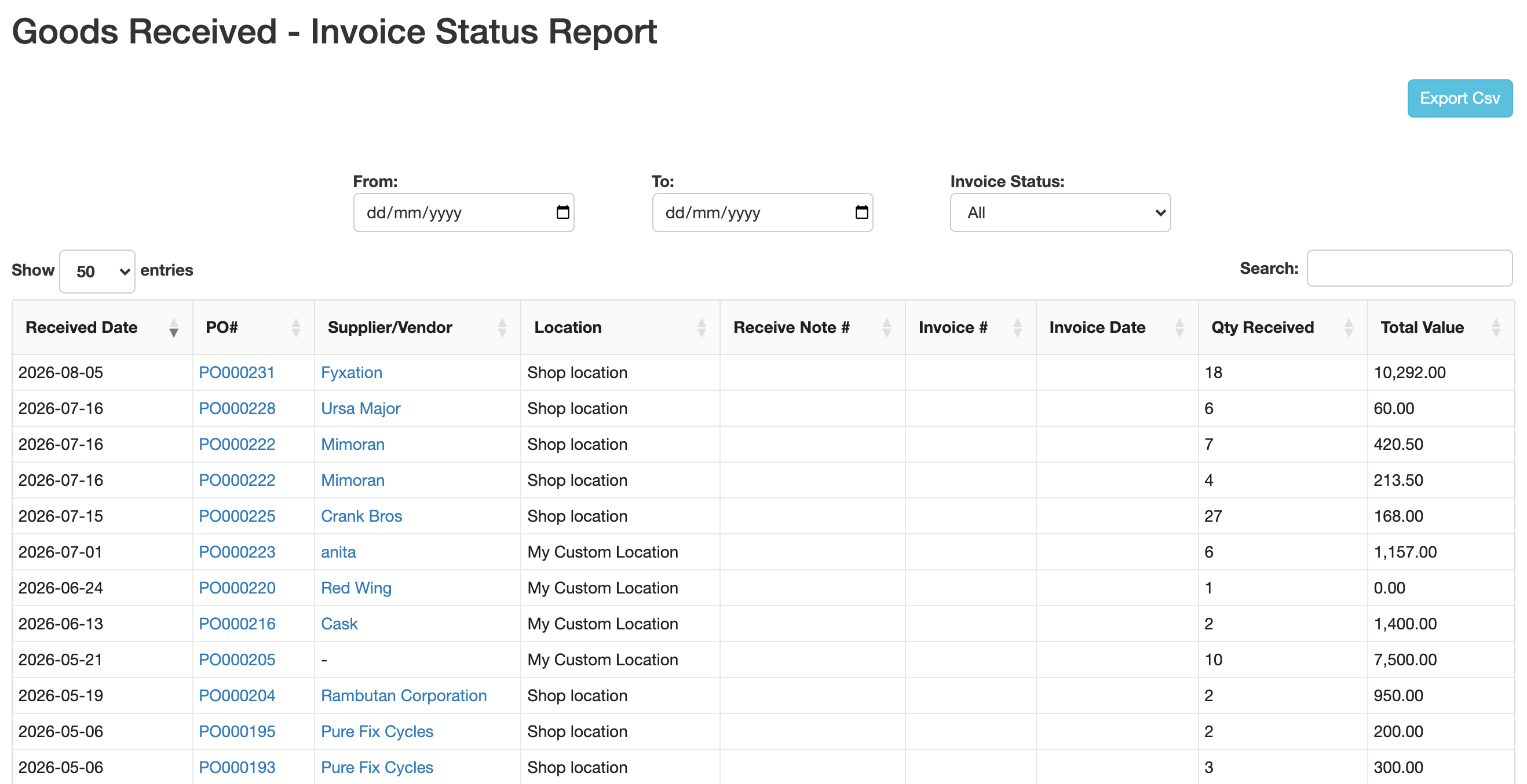
Columns
Each row is one receiving (one click on Receive on a purchase order), so a PO received in two deliveries shows up twice.
| Column | What it shows |
|---|---|
| Received Date | The day you received the goods. |
| PO# | The purchase order. Click it to open the PO. |
| Supplier/Vendor | The supplier or Shopify vendor of the PO. Click the name to open the supplier or vendor page. A PO without a supplier shows -. |
| Location | The location the goods were received into. |
| Receive Note # | The Receive Note you typed when receiving. |
| Invoice # | The Invoice Number you typed when receiving. Empty means not invoiced yet. |
| Invoice Date | The Invoice Date you picked when receiving. |
| Qty Received | Total units received in that delivery. |
| Total Value | Qty received × the cost of each product on the PO. |
Under the table, three totals add up every row that matches your filters:
- Total Qty Received
- Total Value Not Yet Invoiced: deliveries with no Invoice #.
- Total Value Invoiced: deliveries with an Invoice #.
Fill in Invoice Number and Invoice Date on the receive screen of a PO when the supplier's invoice arrives with the goods. Those are the values this report reads.
Filter the report
- From / To: only show goods received between these dates.
- Invoice Status: All, Not Invoiced (no Invoice #) or Invoiced (has an Invoice #).
The page reloads as soon as you change a filter, and the totals follow your filters.
To see the deliveries of one supplier, type the supplier's name in Search above the table. Search also finds PO numbers, locations, notes and invoice numbers. Search only narrows the rows in the table: the totals under it still count every row that matches the filters.
Click a column header to sort by it, for example Received Date to show the newest deliveries first.
Export to CSV
Click Export Csv to download the report with the same filters. The file has the columns PO#, Supplier/Vendor, Location, Received Date, Receive Note #, Invoice #, Invoice Date, Qty Received and Total Value, and a last row with the total quantity and total value.
Since October 26, 2026, the CSV has a Supplier/Vendor column right after PO#. If a spreadsheet or script reads the file by column position instead of by header, update it.
FAQ
Why does a PO show up on several rows? Each row is one delivery. Receiving a PO in parts creates one row per delivery.
Why is the Supplier/Vendor column empty (-) for some POs? The PO was created without a supplier or vendor.
Can I add an invoice number after receiving? The report shows the invoice number and date entered when the goods were received.